
Project – Conway’s Game of Life
The project
Conway’s Game of Life is one of those algorithms that are just fun to write. Not only because it’s relatively easy to implement, but also because it’s an algorithm that gives you visual feedback.
The core concept is easy: setup a grid of cells, setup a rule to apply to each cell on each tick, and run it.
For this I chose to use a simple C# application as it’s where I can do my fastest prototyping, but any language would suffice, as long as you can create some sort of visual representation of the grid.
The rules
The Game of Life at it’s core just has 4 rules, being:
- Any live cell with fewer than two live neighbours dies, as if by underpopulation.
- Any live cell with two or three live neighbours lives on to the next generation.
- Any live cell with more than three live neighbours dies, as if by overpopulation.
- Any dead cell with exactly three live neighbours becomes a live cell, as if by reproduction.
Looking at it, I think we can reduce this to 3 rules that do the same:
// CellState      --> Enum where Dead = 0 and Alive = 1
// aliveNeighbors --> Neighbor cells that have a state of CellState.Alive
// State          --> Class property for the current state of the cell
// NextState      --> Class property for the state of the next lifecycle

// Rule #2
if (CurrentState == Alive && (AliveNeighbors == 2 || AliveNeighbors == 3))
{
    NextState = Alive;
}
// Rule #4
else if (CurrentState == Dead && AliveNeighbors == 3)
{
    NextState = CellState.Alive;
}
// Rule #1 and #3
else
{
    NextState = CellState.Dead;
}
The Game structure
I opted to keep it rather simple. The Windows Form would where I could control the game loop (start, stop, speed, cellsize, etc). For the game I created a World class that would host a grid of Cell classes. The only real logic that lives in the World class is the setup for the grid. It would create the grid and then tell all the Cell classes what their neighbor cells are. Other than that it would not do much, except call functions for it’s child Cell classes. For example, this would be the function to update the board:
/// <summary>
/// Tells all cells in the grid to calculate it's state for the next lifecycle.
/// </summary>
public void CalculateNextState()
{
    for (int i = 0; i < Cells.GetLength(0); i++)
    {
        for (int j = 0; j < Cells.GetLength(1); j++)
        {
            Cells[i, j].CalculateNext();
        }
    }
}

/// <summary>
/// Tells all cells in the grid to update it's current state to the next calculated state.
/// </summary>
public void Update()
{
    for (int i = 0; i < Cells.GetLength(0); i++)
    {
        for (int j = 0; j < Cells.GetLength(1); j++)
        {
            Cells[i, j].Update();
        }
    }
}
The Cell class will keep track of it’s neighbors and current and potential next state. It will also have the functions to calculate the next state and update.
public CellState State;
private CellState NextState;
private List<Cell> Neighbours;

public void CalculateNext()
{
    var aliveNeighbors = Neighbours.Count(n => n.State == CellState.Alive);

    // Rule #2
    if (State == CellState.Alive && (aliveNeighbors == 2 || aliveNeighbors == 3))
    {
        NextState = CellState.Alive;
    }
    // Rule #4
    else if (State == CellState.Dead && aliveNeighbors == 3)
    {
        NextState = CellState.Alive;
    }
    // Rule #1 and #3
    else
    {
        NextState = CellState.Dead;
    }
}

public void Update()
{
    State = NextState;
}
That’s it for the game logic. We have the World class to manage all it’s cells and the cells take care of their own states.
The Gui
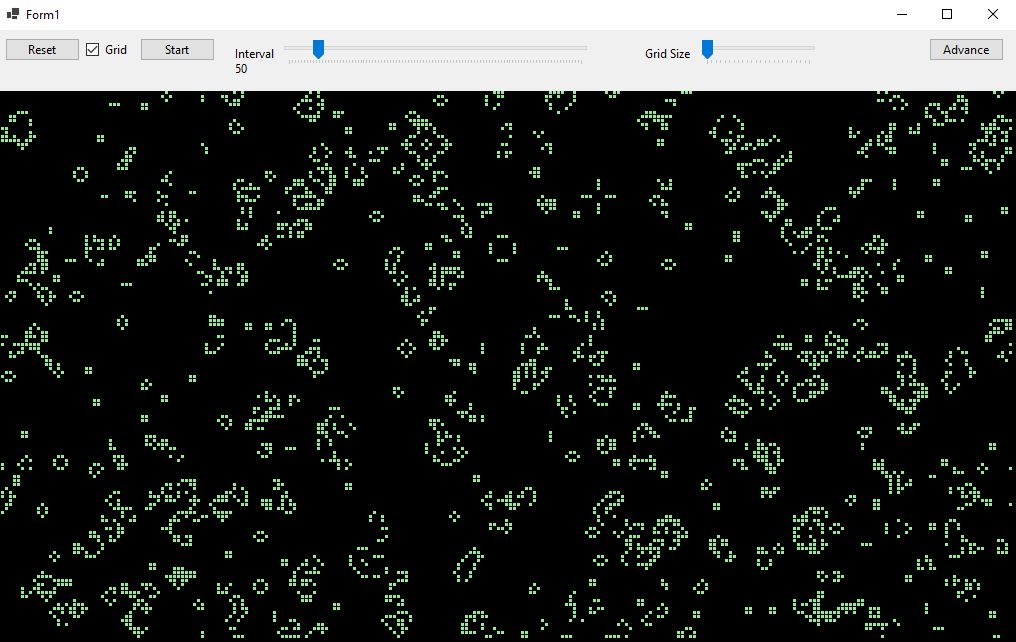
I created a really simple GUI that does only what it needs to do. If you press Start, it will populate the entire grid with random cell states. A timer is spun up that will “tick” every “Interval”. Every tick, it will calculate the next state of the world and then update it. After this, it will draw an image and show it.
It will keep running the game until “Reset” is pressed.
Closing Thoughts
It was surprisingly easy to create this, because of it’s basic structure and that there are only 4 rules. The GUI is rough and unpolished, but that did not hold me back of repeatedly pressing reset to see what would happen that time around.
As you can see there is an Advanced button. I never got around to implementing this, but the idea was that I would implement 2 additional modes: Drawing (and saving) a custom starting state and loading preset (and custom) starting states. This would be interesting because the Game of Life is known for having patterns and generators (see Conway’s Game of Life on Wikipedia.
Maybe in the future I will revisit this project and add the functionality. Who knows.